 Salus
SalusSMS program & opt-in
Salus Emergency Contact Alerts · operated by FINDSALUSLLC
Salus texts people a user has chosen as emergency contacts. Every contact opts in themselves, on a web page, before they can receive any alert. Messages are transactional safety messages only — never marketing. The examples below use a user named Alex; the user's own name appears in real messages.
How a contact opts in
- In the Salus app, the user adds a contact's name and mobile number, then taps Invite.
- The iOS share sheet opens. The user sends a personal link from their own phone, in their own message. Salus does not text the contact at this point.
- The contact opens the link,
https://findsalus.com/j/<code>. The page names the user who invited them, shows a masked version of their number, and shows the full disclosure directly under the button. See the live demo page. - The contact taps Yes, text me Alex's alerts. Tapping is the opt-in. Agreeing is optional; the contact can choose No thanks and receives nothing.
- The contact receives this confirmation text:
Confirmation textSalus: You're confirmed as an emergency contact and will receive emergency alert texts only when the person who added you triggers an alert. Msg frequency varies. Message and data rates may apply. Reply HELP for help, STOP to opt out.
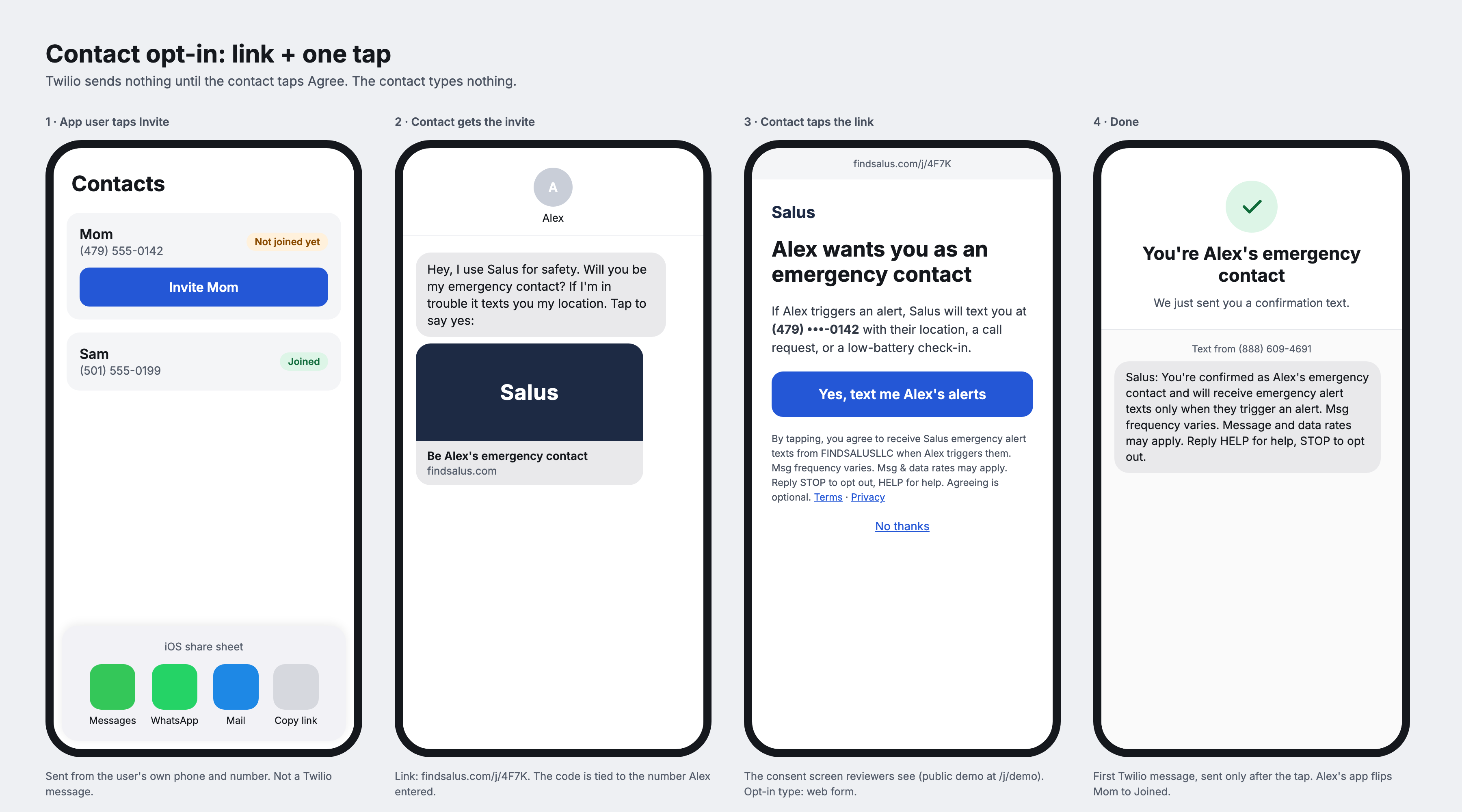
The disclosure shown directly under the button reads: By tapping, you agree to receive Salus emergency alert texts from FINDSALUSLLC when Alex triggers them. Msg frequency varies. Msg & data rates may apply. Reply STOP to opt out, HELP for help. Agreeing is optional.
Alerts a contact who accepted may receive
Sent only when the user who chose them triggers one.
Privacy
No mobile information will be shared with third parties or affiliates for marketing or promotional purposes. Text-messaging opt-in data and consent will not be shared with any third parties. See our Privacy Policy and Terms of Service.
Help
Reply HELP to any message, or email [email protected].